
Free tool /05
Accessibility check: is your website usable by everyone?.
We use Google to check the most common accessibility barriers — contrast, labels, structure. Since 28 June 2025 the European Accessibility Act makes accessibility a legal duty for many websites. No sign-up.

How it works
Three steps, no sign-up.
01
Enter the address
The page to check: the homepage or a service page, wherever most users land.
02
Lighthouse analysis
We use Lighthouse’s Accessibility category via the PageSpeed API: contrast, alt text, form labels, heading structure.
03
See the barriers to remove
A 0–100 score and the list of issues found, explained in plain English. An automatic check covers part of the WCAG criteria, not all of them.
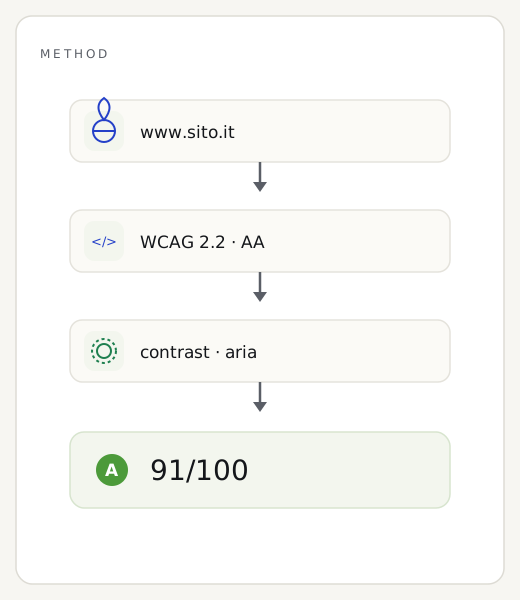
The method
What this website accessibility test actually checks.
The engine is Lighthouse’s Accessibility category, called through the PageSpeed API: the same automatic checks Google makes available to developers. In a few seconds the page is examined against dozens of technical rules — contrast between text and background, image alt text, form field labels, heading order, correct use of ARIA attributes — producing a 0–100 score with the list of barriers found.
It’s worth being clear about the limits, because it’s easy to fool yourself here. An automatic check only catches part of the WCAG 2.1 AA criteria: it captures what a machine can measure, not what a person needs to test. It doesn’t check keyboard navigation, the experience with a screen reader, or how clear your content is for people with cognitive difficulties. It’s the first step toward the compliance required by the European Accessibility Act, not the final certificate.
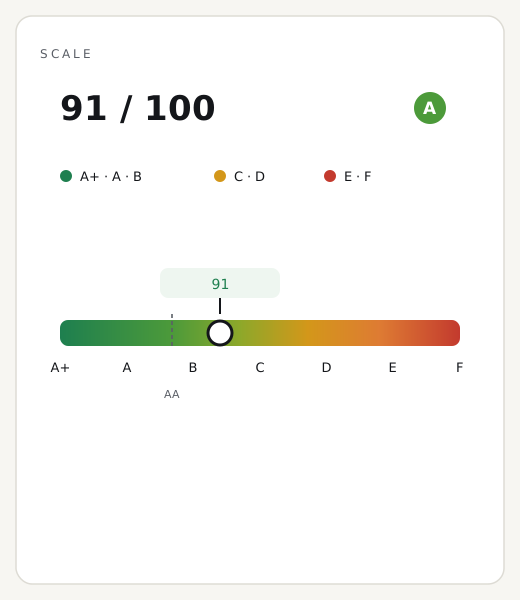
Reading the result
How to read the score and the barriers found.
The 0–100 number tells you how well the page passes the automatic checks: the higher it is, the fewer obvious obstacles remain. But the score matters less than the list that comes with it. Each entry is a concrete barrier for a real person — contrast too weak for someone with low vision, a button with no label for someone using a screen reader. Start from those, not from the total.
A warning against false confidence: even a perfect 100 doesn’t mean “compliant website”. It means you’ve passed the tests a machine can run, which cover roughly a third of the possible issues. The rest — keyboard, screen readers, content — has to be checked by hand. So treat a high score as a good foundation, not as a finish line already crossed.
Why it’s worth showing
The accessibility badge, before anyone asks.
Since 28 June 2025 the European Accessibility Act makes accessibility mandatory, no longer optional, for many sites selling products or services in Europe. It’s a recent shift: very few competitors show it yet, and being first to display it signals an attention that visitors — and B2B buyers — notice. Unlike compliance seals that promise everything, ours is honest about its limits right in the name: “verified,” not “certified.” The automated test catches a concrete, measurable share of the WCAG rules — a good public starting point, not the final word on legal compliance, which remains a job for a manual audit.
<a href="https://remarka.biz/en/tools/accessibility-check/" target="_blank" rel="noopener">
  <img src="https://remarka.biz/wp-admin/admin-ajax.php?action=remarka_badge&t=a11y&s=92&d=2026-07&th=dark&l=en"
       alt="Accessibility verified — Remarka" width="160" height="59" loading="lazy">
</a>
Three common questions
What is the European Accessibility Act?
A European directive (EAA), in force in Italy since 28 June 2025: many websites of businesses selling to consumers must be accessible to the WCAG 2.1 level AA standard. It’s a legal duty, with some exemptions for microenterprises.
Is this test enough to be compliant?
No: an automatic check catches only part of the WCAG criteria. Full compliance also requires manual testing — keyboard navigation, screen readers, content. It’s a great starting point, not a certificate.
Does this apply to my business too?
If you sell goods or services to consumers online (e-commerce, banking, transport, services), most likely yes. Microenterprises offering services have exemptions: it’s best to check case by case.
How to improve
How to make your website accessible to everyone.
Many barriers fall with simple fixes that improve the experience for everyone, not just for people with disabilities.
01
Increase your contrast
Text and background need a contrast ratio of at least 4.5:1: the elegant light grey that looks fine on a designer’s screen becomes unreadable in sunlight or for people with low vision.
02
Describe your images
Every informative image needs alt text describing its content: it’s what a screen reader reads out to someone who can’t see it.
03
Label your forms
Every field needs an explicit, properly linked label — “Name”, “Email”, “Message” — not just grey placeholder text that vanishes as soon as you start typing.
04
Put your headings and focus order in order
A consistent heading hierarchy and a keyboard-navigable path, with focus always visible, make the page usable even without a mouse.
05
Don’t rely on colour alone
An error flagged only in red is invisible to someone who can’t distinguish colours: always pair it with an icon or text explaining what’s happening.
Want to make the website accessible?
We check the barriers one by one — automatic and manual — and fix them to the WCAG 2.1 AA standard.
The other free tools