пере.рф

Case studies / Web app · AI platform

An AI translation platform on a two-letter domain.

пере.рф is a platform that translates whole documents — DOCX, XLSX, PDF, even scanned ones — keeping their tables, styles and terminology intact. We designed and built it as our own team: a translation engine powered by AI models, wrapped in serious engineering, on one of the shortest domains there is.

пере.рф ↗

пере.рф
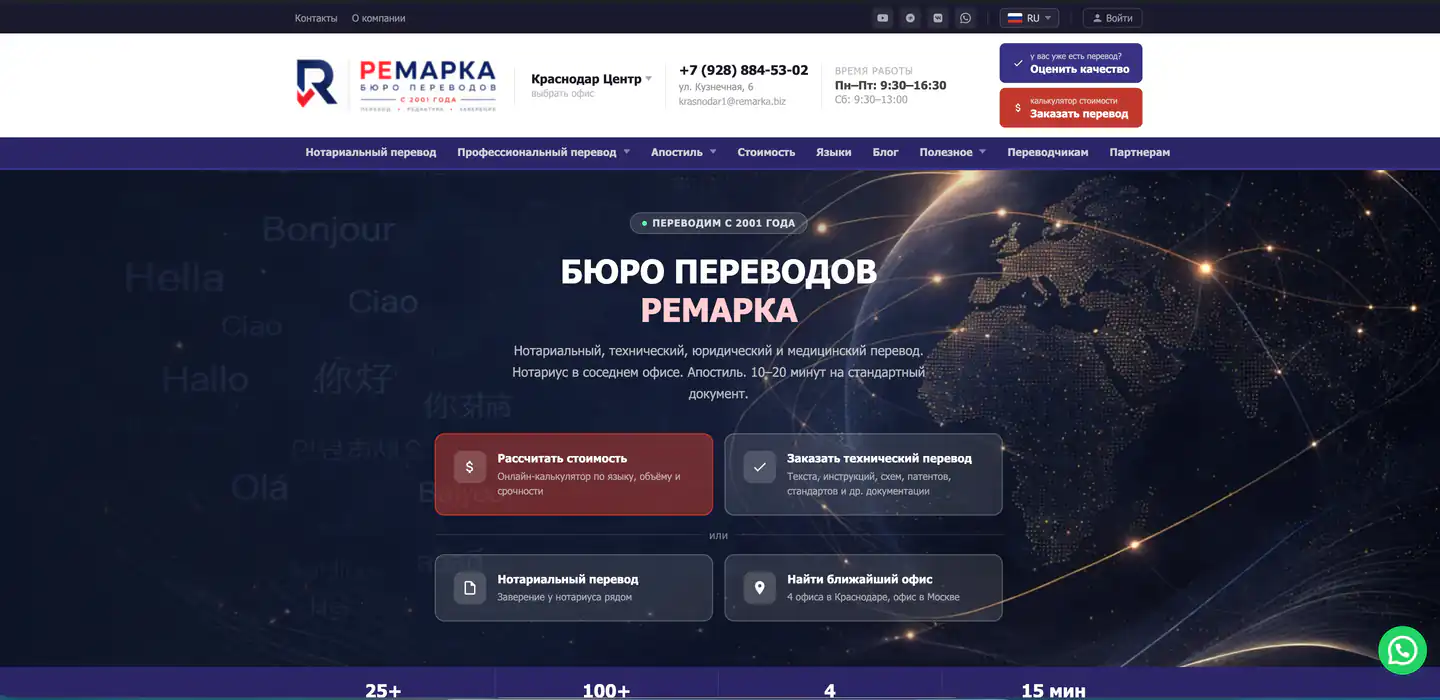
Home page of the пере.рф AI translation platform: document upload and language selection

The problem

Translating documents by hand doesn’t scale.

Contracts, certificates, spreadsheets, scanned PDFs: translating them by hand means retyping tables, redoing the layout and chasing term consistency page after page. Generic machine translators, on the other side, flatten the formatting and ignore the vocabulary of the field.

What was needed was a system that translates the document, not just the text: one that gives back the same file, in the same shape, in another language — with the terminology under control.

Our answer

A platform that translates the document, not just the text.

We designed and developed пере.рф: you upload a DOCX, an XLSX or a PDF and get the same document translated, with its tables, styles and headings in place. The translation engine is powered by AI models; around it, a queue-and-worker architecture that copes with large files and long jobs. It is the same kind of engineering we put into the custom web apps we build for our clients.

Multi-format — DOCX, XLSX, PDF (scanned too), TXT, HTML, up to 100 MB
OCR for scanned PDFs, document structure rebuilt on the way out
Auto glossary and translation memory for term consistency
Automatic quality checks and real-time progress on screen

What we built

The features, from the uploaded file to the translated document.

01Multi-format upload. DOCX, XLSX, PDF with text or scanned, TXT and HTML, up to 100 MB per file, with text and structure extraction.
02Automatic pipeline. Every document runs through the states uploading → analyzing → ready, with domain detection before translation even starts.
03AI translation engine. OpenAI GPT models: one model analyzes domain and style, another translates the text split into chunks.
04Auto glossary. Bilingual terms extracted from the document, editable by hand, with TMX export for external CAT tools.
05Translation memory. Identical segments already translated are reused across projects, for consistency and savings.
06Quality assurance. A QA engine checks missing segments, terminology, numbers and formatting, with severity levels.
07Multi-format export. DOCX and XLSX rebuilt with tables and styles, side-by-side bilingual version and TMX file.
08Realtime and accounts. Translation progress over WebSocket, plans and payments, admin panel, bring-your-own AI key (BYOK).

How it works

A document’s journey, from upload to translated file.

Every step of the journey is a queued job: if one step is slow — the OCR of a PDF, the translation of a long file — it doesn’t block the interface, and it can resume from a checkpoint without starting over.

01File analysis. Text and structure extracted from the DOCX, the XLSX or the PDF; for scanned PDFs, OCR steps in.
02Domain analysis. An AI model classifies the topic, the technical level and the style of the document.
03Glossary and instructions. Bilingual terms extracted and custom translation instructions generated for that text.
04Chunked translation. The text is split into segments and translated in batches, with translation memory acting as a cache and automatic retry on errors.
05Quality check. Missing segments, terminology, numbers and formatting verified before delivery.
06File rebuild. The document is reassembled with its structure, plus the bilingual version and the TMX export.

How it’s built inside

A queue-based architecture, built for large files.

A modular backend API; the heavy operations — parsing, OCR, translation, QA, export — go through a queue handled by dedicated workers, so the interface stays responsive and every job can resume from a checkpoint. Document conversion and rebuilding live in a separate Python microservice.

FrontNext.js 15 and React 19, TypeScript, Tailwind, Framer Motion
BackendNestJS on Fastify, Prisma ORM, modular API
DataPostgreSQL — documents, jobs, glossaries, translation memory, usage logs
QueueBullMQ + Redis, dedicated workers with checkpoints and retry
AIOpenAI GPT models for domain analysis, translation and QA
FilesS3-compatible storage (MinIO/S3), OCR with Tesseract and PaddleOCR
AuthJWT and Google OAuth, roles and plans, Stripe payments
DeployDocker Compose, Nginx, CI/CD with GitHub Actions

The phases

Built in phases, without redoing anything twice.

Each phase delivers something usable and sets up the next. The same method we use to bring clients’ projects online: first the foundations, then the flow that brings value, then the rest.

01Foundations. Project structure, authentication, roles and plans, first version of the database.
02Upload and document pipeline. Multi-format upload, parsing, OCR, domain detection.
03AI translation engine. Chunked translation, auto glossary, translation memory.
04Quality and export. QA engine, DOCX and XLSX rebuild, bilingual version, TMX.
05Realtime, payments and admin. Progress over WebSocket, plans and payments, admin panel.

The result

A complete platform, on a two-letter domain.

From file upload to the delivery of the translated document, everything runs through one platform: AI engine, glossary, memory, quality checks and export in a single flow. And it lives on пере.рф — an address you can dictate over the phone in one second.

16

supported languages, including Italian, English and Russian

5

file formats: DOCX, XLSX, PDF, TXT, HTML

100 MB

maximum size per single document

REMARKA GROUP PROJECT — LIVE AT пере.рф

Interested in this project?

Need a custom app or website? Let’s talk.

We design and develop custom websites and web apps for companies and professionals. Tell us your idea: a quote in 24 hours, at a fixed price.