
22 JUL 2026
Backup and site security: what you lose if it disappears tomorrow
Imagine opening your site tomorrow morning and finding a blank page, or worse, a “site compromised” warning. No advance notice: a skipped update, a weak password, a server that gives out. For a small business, website security isn’t a topic for large companies with IT departments: it’s the difference between an hour’s setback and the loss of years of work. Let’s look at what you really risk if the site disappears, what the concrete threats are for an SME, and the few moves — backup first — that keep you safe.
What you lose if the site disappears tomorrow.
A site isn’t just a set of pages: it’s capital accumulated over the years. Losing it means losing the Google ranking built article after article, the contacts and orders that came through the forms, the photos and copy you curated, sometimes the only channel through which customers find you. And there’s the less visible damage: every hour offline is an enquiry that doesn’t arrive and a customer who opens the competitor.
The worst blow, though, is when there’s no way back. Without a recent, working backup, a compromised or deleted site can simply be unrecoverable: you start from scratch, with weeks of work and a dented reputation. The difference between a disaster and a nuisance isn’t luck: it’s having prepared beforehand.
The real threats for an SME.
The misconception to dispel is “who’s going to bother attacking my site anyway.” In the vast majority of cases there’s no flesh-and-blood hacker interested in you: there are automated programs that scour the entire network looking for sites with known flaws. And known flaws abound: security reports like Patchstack’s catalogue thousands of vulnerabilities every year in the most widespread plugins and themes, almost all in components someone didn’t update.
The most common entry points are mundane: an unpatched plugin or CMS, a weak or reused password, an admin login left open. Added to these are the failures that have nothing to do with malice: a server that breaks, a host that shuts down, a file deleted by mistake. Website security for an SME concerns all these things together, not just the movie-style attacks.
Website security for SMEs: the basics that are enough.
The good news is that much of the risk is knocked down with a few basic habits, within anyone’s reach. Keeping the CMS, themes and plugins updated is by far the most important: most attacks exploit flaws that have already been fixed, which only hit those who didn’t install the update. Then strong, unique passwords, with two-factor authentication on admin logins, and HTTPS active across the whole site.
The rest is access discipline: granting admin permissions only to those who need them, removing unused accounts, choosing a serious host that does its part. These are the same hardening practices WordPress’s official documentation has collected for years. You don’t need to be a cybersecurity expert: you need to not leave the doors open.
Measure your site’s health and security for free →
The backup: the 3-2-1 rule.
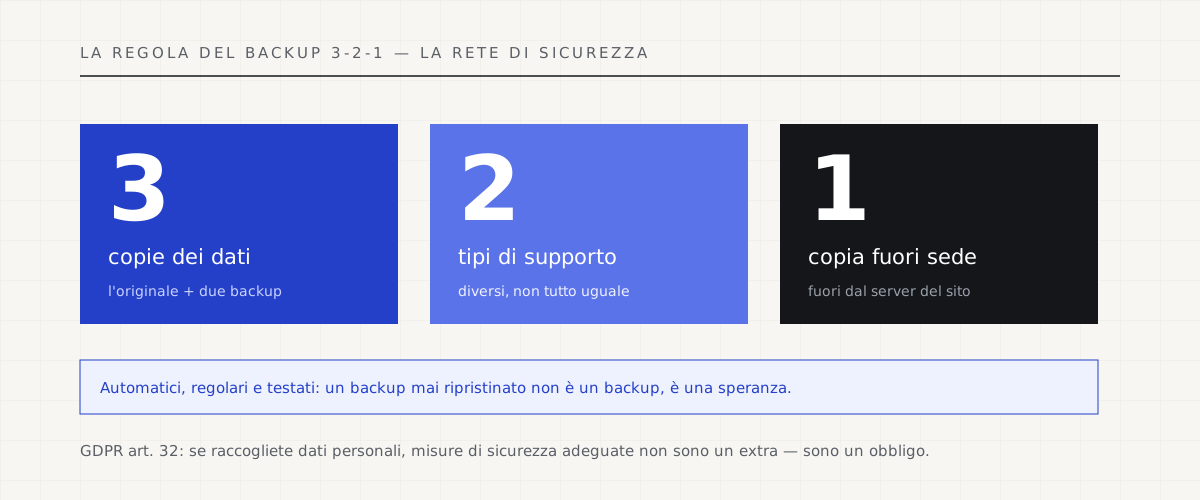
If you must remember one single thing from this article, it’s the backup. The proven rule is called 3-2-1: three copies of the data, on two different types of media, one of which kept elsewhere — off the site’s server. That way, if the hosting fails, the external copy saves you; if an attack encrypts everything, you have a clean one to start from. And backups must be automatic and regular, not “when I remember.”
There’s a detail almost everyone overlooks: a backup you’ve never tried to restore isn’t a backup, it’s a hope. It has to be tested at least once, to be sure it really restores and that it’s complete. The right question isn’t “do I make backups?”, but “how long does it take me to bring the site back online from a backup, and have I ever checked?”.
Security is a duty too (GDPR, Article 32).
There’s one more reason to take the matter seriously: the law. If your site collects personal data — and a contact form is enough — Article 32 of the GDPR requires you to adopt security measures adequate to protect it. A breached site that exposes your customers’ addresses isn’t just a technical hitch: it can become a data breach to be notified, with the consequences that follow. Security and compliance, here, are the same thing.
It’s the approach we hold on every project: updates, automatic and tested backups, controlled access aren’t an extra to sell you separately, they’re the minimum for a site to be an investment and not a gamble. A fast, beautiful site that disappears overnight wasn’t a good site: it was a well-varnished risk.
What a business website includes, security and maintenance and all →
Read also: privacy-first alternatives to Google Analytics →
Sources.
The figures and claims in this article come from here. These are primary sources, not summaries: open them and check for yourself.
- WordPress — site backup (official documentation)How and why to make regular backups: the official guide, valid well beyond WordPress.
- WordPress — hardening securityThe basic practices for closing the doors: updates, permissions, access. Simple and decisive.
- Patchstack — State of WordPress SecurityThe annual vulnerability report: thousands every year, almost all in components that weren’t updated.
- GDPR Regulation 2016/679 — EUR-LexArticle 32 requires adequate security measures: protecting customers’ data is also a legal obligation.
Let’s talk about your website.
Free analysis of your current website; a fixed quote within 24 hours of the call.